XTester
Liquidation Despite a Stop-Loss: What a Backtest Must Account For
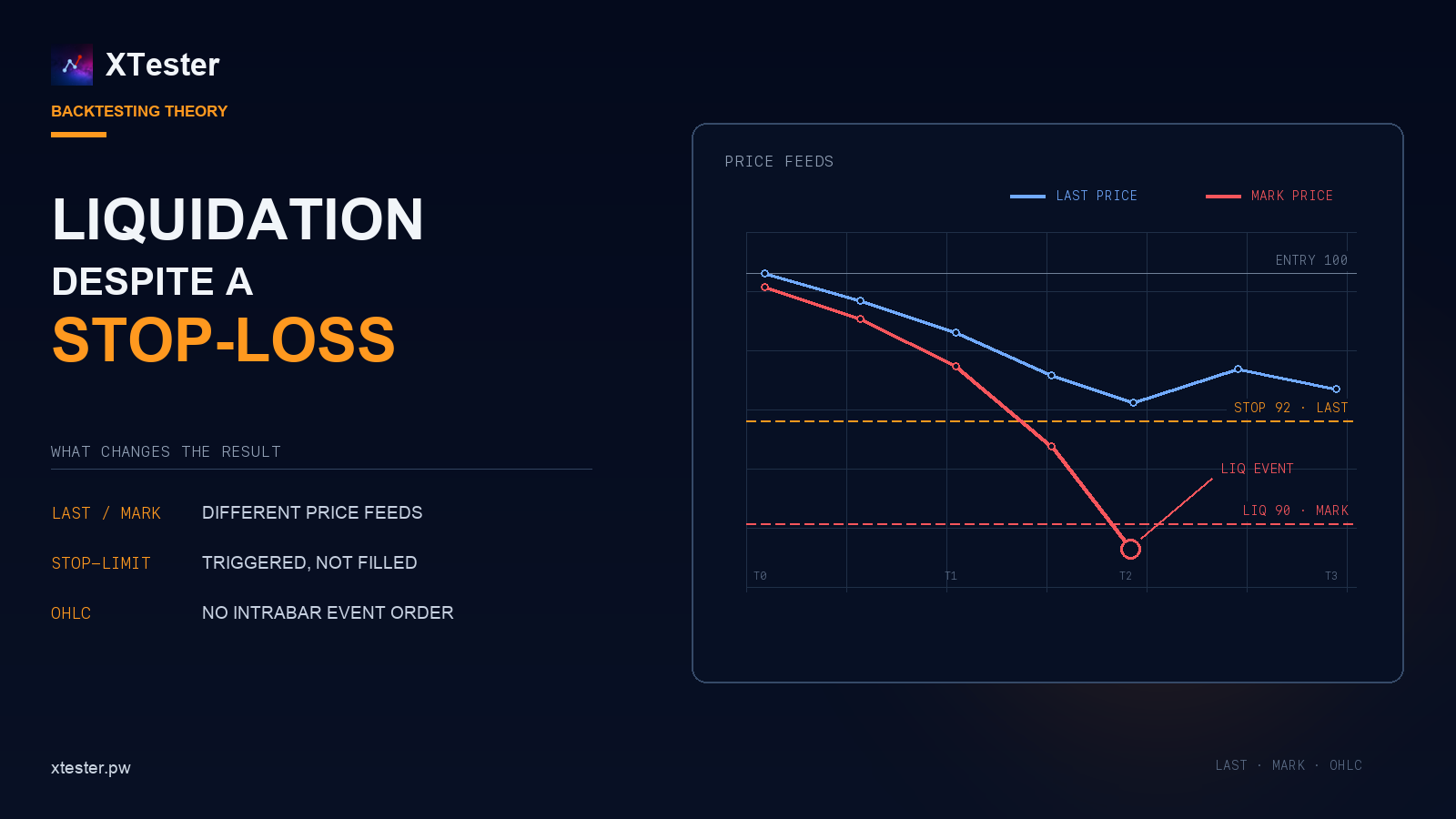
Consider a long position entered at 100, with a stop at 92 and an estimated liquidation price of 90. The obvious conclusion is that the market must pass through 92 before it reaches 90, so the stop should close the position first.
That is true if the stop and liquidation engine watch the same price, the market does not gap through the level, and the closing order fills immediately. On an exchange, those conditions do not always hold. A backtest that assumes them by default can report a stop-loss exit where the live position would have been liquidated.
One level, different price feeds
A futures contract has several price feeds. Last Price is the price of the latest trade. Index Price is calculated from external markets. Mark Price is used to value the position and, on many exchanges, to control liquidation.
The stop can still be configured to trigger on Last Price. Bybit documents a case where Mark Price reaches the liquidation level before Last Price activates the stop. Binance also uses Mark Price in its futures liquidation mechanism.
A one-minute example:
| Parameter | Value |
|---|---|
| Entry | 100 |
| Stop triggered by Last Price | 92 |
| Liquidation triggered by Mark Price | 90 |
| Lowest Last Price | 93 |
| Lowest Mark Price | 89 |
Last Price never reaches 92, so the stop is not triggered. Mark Price moves through 90, and the exchange starts liquidation. There is no contradiction in the event order: the two conditions are watching different data.
A basic simulator often stores only Last Price candles and uses them for every calculation. This may be sufficient for some entry models. With leveraged positions, substituting one price feed for another can change the result of the trade.
A triggered stop is not a closed position
Once the stop price is reached, the exchange still has to create and execute a closing order. Those are separate events.
A stop-market order submits a market order. It will usually close the position, but the fill depends on the order book. During a sharp move, the execution price may be significantly worse than the stop price.
A stop-limit order has a different failure mode. Suppose the trigger is 92 and the sell limit is 91.8. The market jumps from 92.1 to 89. The stop triggers and places the limit order, but there may be no buyer willing to pay 91.8 or more. The position remains open.
A common backtesting error is to treat a touch of the stop level as a completed trade. The report immediately records a fill at the requested price even though the live exchange would only have triggered an order at that point. This assumption is especially favourable to strategies that use tight stops and high leverage.
What a candle does not tell you
An OHLC candle stores the open, high, low, and close for a period. It does not store the sequence of trades inside that period.
A one-minute candle can show that the market touched a level. It cannot tell us how long liquidity was available there, how much volume traded, whether the order had time to fill, or how Mark Price moved during the same second. When several dependent events fall inside one bar, their order has to be reconstructed from finer data or defined by the simulator.
Moving from hourly to one-minute candles reduces the uncertainty but does not remove it. Testing protective orders properly requires separate Last Price and Mark Price feeds at a minimum. Execution-sensitive strategies may also require trade data or order-book snapshots.
If those data are not available, the test should either use a conservative scenario or mark the trade as ambiguous. Automatically selecting the more profitable sequence introduces a small bias on every affected trade, which can become material over a long test.
Cross and isolated margin need different models
With isolated margin, the risk of a position is limited to the margin allocated to it. Funds elsewhere in the account do not normally move its liquidation price automatically.
Cross margin uses a shared margin pool. The position is affected by the account balance, unrealised PnL from other positions, fees, funding, open orders, and maintenance-margin requirements.
This is why a rough formula such as “entry price minus a leverage percentage” is suitable only for an initial estimate. A simulator needs the rules of the specific exchange and must recalculate account state after every fill, fee, and funding payment.
Several bots trading on one cross-margin account are a separate case. They cannot be tested as fully independent positions if they will share margin in live trading. A loss from one bot changes the liquidation buffer available to the others.
How to model this in a simulator
The simulator should treat the following as separate events:
- reaching the trigger price;
- creating the closing order;
- partial or complete execution;
- updating the position and available margin;
- checking the liquidation condition;
- stopping the simulation if the account can no longer continue.
Each event needs an explicit price feed. If historical Mark Price data are unavailable, that limitation should be recorded in the run settings. Replacing Mark Price with Last Price can be a supported approximation, but it should not be a hidden detail of the engine.
Liquidation should not be reported as a normal strategy exit either. It is a separate exit reason. Otherwise, a bot that regularly leaves positions open until forced liquidation can look like a strategy with an unusually wide stop.
Profit and drawdown are not enough for this part of the report. It should also show the number of liquidations, protective orders that triggered but did not fill, realised slippage, the minimum margin buffer, and ambiguous bars. These figures make it possible to separate the strategy result from the simulator's execution assumptions.
If the stop and liquidation are calculated from the same price, the stop is above the liquidation level, the market does not gap through it, and the market order fills without delay, the stop should execute first. Any other result needs an explanation. The cause is usually the price feed, order type, execution model, or margin calculation.
A stop taken out by liquidation is one case of a broader question: how to backtest a crypto strategy without overstating the result.
Exchange documentation
This material is for information only and is not investment advice. Backtest results do not guarantee future returns.